
사부작사부작
Custom ItemReader/ItemWriter 구현방법 알아보기 본문
진행중인 배치 스터디를 학습하며 작성한 글입니다.
[SpringBatch 연재 09] 입맛에 맞는 배치 처리를 위한 Custom ItemReader/ItemWriter 구현방법 알아보기
devocean.sk.com
스프링 배치가 ItemReader, ItemWriter를 제공해주지만, 보다 딱 맞는 배치를 수행하기 위해서는 커스터마이징이 필요합니다.
### Custom ItemReader
이번 학습에선 QueryDSL을 이용한 QueryDslPagingItemReader를 구현할 예정입니다.
QueryDSL은 스프링 배치에서 공식적으로 지원하는 ItemReader가 아닙니다. 그렇기에 AbstractPagingItemReader을 이용하여 커스텀 ItemReader를 만들어 볼 것입니다. Querydsl은 이용하면 데이터를 효율적으로 읽을 수 있으며 동적 쿼리 지원으로 런타임 시에 조건에 맞는 쿼리 생성이 가능해집니다.
AbstractPagingItemReader 클래스를 먼저 보겠습니다.
public abstract class AbstractPagingItemReader<T> extends AbstractItemCountingItemStreamItemReader<T>
		implements InitializingBean {

	protected Log logger = LogFactory.getLog(getClass());

	private volatile boolean initialized = false;

	private int pageSize = 10;

	private volatile int current = 0;

	private volatile int page = 0;

	protected volatile List<T> results;

	private final Lock lock = new ReentrantLock();

	public AbstractPagingItemReader() {
		setName(ClassUtils.getShortName(AbstractPagingItemReader.class));
	}

	@Nullable
	@Override
	protected T doRead() throws Exception {

		this.lock.lock();
		try {

			if (results == null || current >= pageSize) {

				if (logger.isDebugEnabled()) {
					logger.debug("Reading page " + getPage());
				}

				doReadPage();
				page++;
				if (current >= pageSize) {
					current = 0;
				}

			}

			int next = current++;
			if (next < results.size()) {
				return results.get(next);
			}
			else {
				return null;
			}

		}
		finally {
			this.lock.unlock();
		}

	}

	...

	abstract protected void doReadPage();

	...

	@Override
	protected void doClose() throws Exception {

		this.lock.lock();
		try {
			initialized = false;
			current = 0;
			page = 0;
			results = null;
		}
		finally {
			this.lock.unlock();
		}

	}

	...
}
이 클래스를 상속받아 구현할 QueryDslPagingItemReader는 doRead() 메서드에서 호출중인 doReadPage() 를 구현해야 합니다.
public class QuerydslPagingItemReader<T> extends AbstractPagingItemReader<T> {

    private EntityManager em;
    private final Function<JPAQueryFactory, JPAQuery<T>> querySupplier;
    private final Boolean alwaysReadFromZero;

    public QuerydslPagingItemReader(EntityManagerFactory entityManagerFactory, Function<JPAQueryFactory, JPAQuery<T>> querySupplier, int chunkSize) {
        this(ClassUtils.getShortName(QuerydslPagingItemReader.class), entityManagerFactory, querySupplier, chunkSize, false);
    }

    public QuerydslPagingItemReader(String name, EntityManagerFactory entityManagerFactory, Function<JPAQueryFactory, JPAQuery<T>> querySupplier, int chunkSize, Boolean alwaysReadFromZero) {
        super.setPageSize(chunkSize);
        setName(name);
        this.querySupplier = querySupplier;
        this.em = entityManagerFactory.createEntityManager();
        this.alwaysReadFromZero = alwaysReadFromZero;
    }

    @Override
    protected void doClose() throws Exception {
        if (em != null)
            em.close();
        super.doClose();
    }

    @Override
    protected void doReadPage() {
        initQueryResult();

        JPAQueryFactory jpaQueryFactory = new JPAQueryFactory(em);
        long offset = 0;
        if (!alwaysReadFromZero) {
            offset = (long) getPage() * getPageSize();
        }

        JPAQuery<T> query = querySupplier.apply(jpaQueryFactory).offset(offset).limit(getPageSize());

        List<T> queryResult = query.fetch();
        for (T entity: queryResult) {
            em.detach(entity);
            results.add(entity);
        }
    }

    private void initQueryResult() {
        if (CollectionUtils.isEmpty(results)) {
            results = new CopyOnWriteArrayList<>();
        } else {
            results.clear();
        }
    }
}
생성자를 보면 chunkSize는 페이지 사이즈, 즉 한번에 읽어올 아이템 수를 나타내고
name은 ItemReader를 구분하기 위한 이름입니다.
alwaysReadFromZero는 페이징을 0부터 시작할지 여부를 나타내는 플래그입니다.
Function<JPAQueryFactory, JPAQuery>는 JPAQuery 형태의 queryDSL 쿼리를 반환합니다.
public QuerydslPagingItemReader(String name, EntityManagerFactory entityManagerFactory, Function<JPAQueryFactory, JPAQuery<T>> querySupplier, int chunkSize, Boolean alwaysReadFromZero) {
        super.setPageSize(chunkSize);
        setName(name);
        this.querySupplier = querySupplier;
        this.em = entityManagerFactory.createEntityManager();
        this.alwaysReadFromZero = alwaysReadFromZero;
    }
편의를 위한 빌더 클래스
public class QuerydslPagingItemReaderBuilder<T> {

    private EntityManagerFactory entityManagerFactory;
    private Function<JPAQueryFactory, JPAQuery<T>> querySupplier;

    private int chunkSize = 10;

    private String name;

    private Boolean alwaysReadFromZero;

    public QuerydslPagingItemReaderBuilder<T> entityManagerFactory(EntityManagerFactory entityManagerFactory) {
        this.entityManagerFactory = entityManagerFactory;
        return this;
    }

    public QuerydslPagingItemReaderBuilder<T> querySupplier(Function<JPAQueryFactory, JPAQuery<T>> querySupplier) {
        this.querySupplier = querySupplier;
        return this;
    }

    public QuerydslPagingItemReaderBuilder<T> chunkSize(int chunkSize) {
        this.chunkSize = chunkSize;
        return this;
    }

    public QuerydslPagingItemReaderBuilder<T> name(String name) {
        this.name = name;
        return this;
    }

    public QuerydslPagingItemReaderBuilder<T> alwaysReadFromZero(Boolean alwaysReadFromZero) {
        this.alwaysReadFromZero = alwaysReadFromZero;
        return this;
    }

    public QuerydslPagingItemReader<T> build() {
        if (name == null) {
            this.name = ClassUtils.getShortName(QuerydslPagingItemReader.class);
        }
        if (this.entityManagerFactory == null) {
            throw new IllegalArgumentException("EntityManagerFactory can not be null.!");
        }
        if (this.querySupplier == null) {
            throw new IllegalArgumentException("Function<JPAQueryFactory, JPAQuery<T>> can not be null.!");
        }
        if (this.alwaysReadFromZero == null) {
            alwaysReadFromZero = false;
        }
        return new QuerydslPagingItemReader<>(this.name, entityManagerFactory, querySupplier, chunkSize, alwaysReadFromZero);
    }
}
샘플 코드를 이용해서 확인해보겠습니다.
먼저 코드와 처리하려는 데이터입니다.
@Slf4j
@Configuration
public class QueryDSLPagingReaderJobConfig {

    /**
     * CHUNK 크기를 지정한다.
     */
    public static final int CHUNK_SIZE = 2;
    public static final String ENCODING = "UTF-8";
    public static final String QUERYDSL_PAGING_CHUNK_JOB = "QUERYDSL_PAGING_CHUNK_JOB";

    @Autowired
    DataSource dataSource;

    @Autowired
    EntityManagerFactory entityManagerFactory;

    @Bean
    public QuerydslPagingItemReader<Customer> customerQuerydslPagingItemReader() {
        return new QuerydslPagingItemReaderBuilder<Customer>()
                .name("customerQuerydslPagingItemReader")
                .entityManagerFactory(entityManagerFactory)
                .chunkSize(2)
                .querySupplier(jpaQueryFactory ->
                        jpaQueryFactory
                        .select(QCustomer.customer)
                        .from(QCustomer.customer)
                        .where(QCustomer.customer.age.gt(20))
                )
                .build();
    }

    @Bean
    public FlatFileItemWriter<Customer> customerQuerydslFlatFileItemWriter() {

        return new FlatFileItemWriterBuilder<Customer>()
                .name("customerQuerydslFlatFileItemWriter")
                .resource(new FileSystemResource("./output/customer_new_v2.csv"))
                .encoding(ENCODING)
                .delimited().delimiter("\t")
                .names("Name", "Age", "Gender")
                .build();
    }


    @Bean
    public Step customerQuerydslPagingStep(JobRepository jobRepository, PlatformTransactionManager transactionManager) throws Exception {
        log.info("------------------ Init customerQuerydslPagingStep -----------------");

        return new StepBuilder("customerJpaPagingStep", jobRepository)
                .<Customer, Customer>chunk(CHUNK_SIZE, transactionManager)
                .reader(customerQuerydslPagingItemReader())
                .processor(new CustomerItemProcessor())
                .writer(customerQuerydslFlatFileItemWriter())
                .build();
    }

    @Bean
    public Job customerJpaPagingJob(Step customerJdbcPagingStep, JobRepository jobRepository) {
        log.info("------------------ Init customerJpaPagingJob -----------------");
        return new JobBuilder(QUERYDSL_PAGING_CHUNK_JOB, jobRepository)
                .incrementer(new RunIdIncrementer())
                .start(customerJdbcPagingStep)
                .build();
    }
}
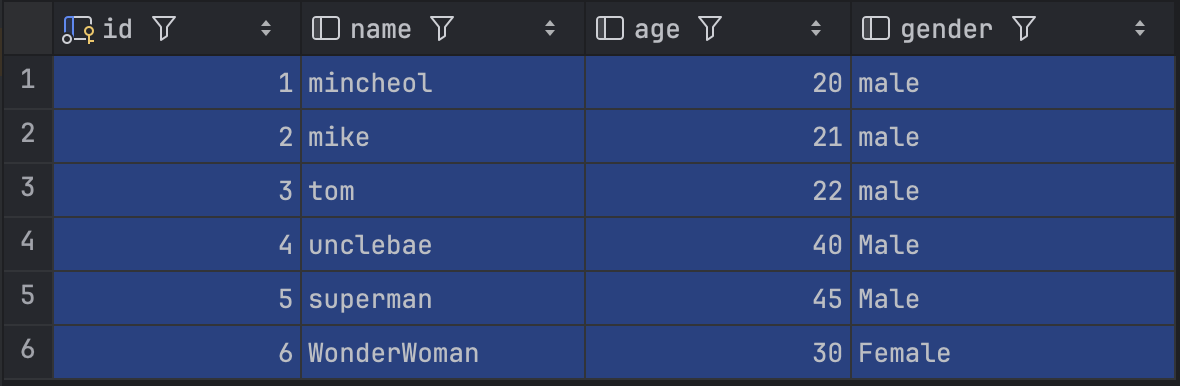
6개의 데이터가 있고 QueryDSL 을 이용해 where 절에 age가 20보다 큰 조건을 줬습니다. 그렇다면 5개의 데이터를 읽어와야 정확히 동작한다고 볼 수 있습니다.
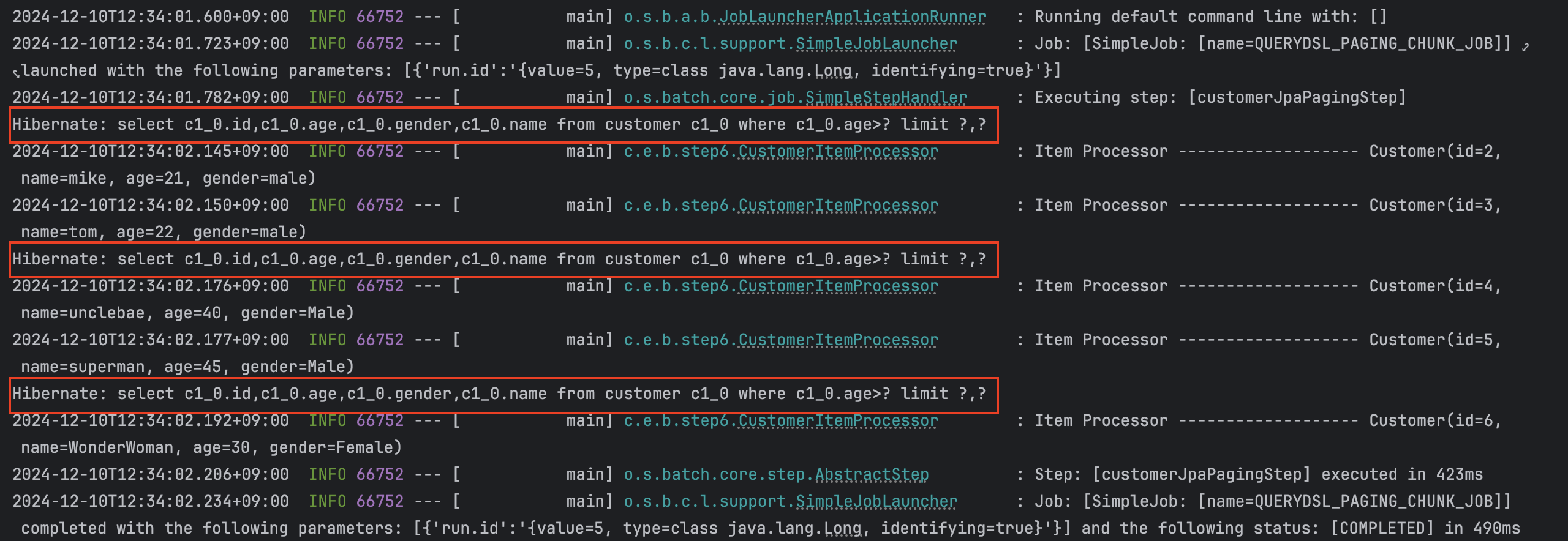
먼저 로그를 보면 청크 사이즈, 즉 페이지 크기가 2인 만큼 해당 과정은 3번의 쿼리를 보내서 처리한걸 볼 수 있습니다.
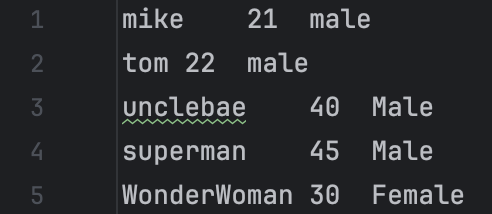
그리고 결과를 봐도 5개의 데이터만 가져온걸 확인할 수 있습니다.
그러면 age 조건을 40보다 크게 변경해보겠습니다.
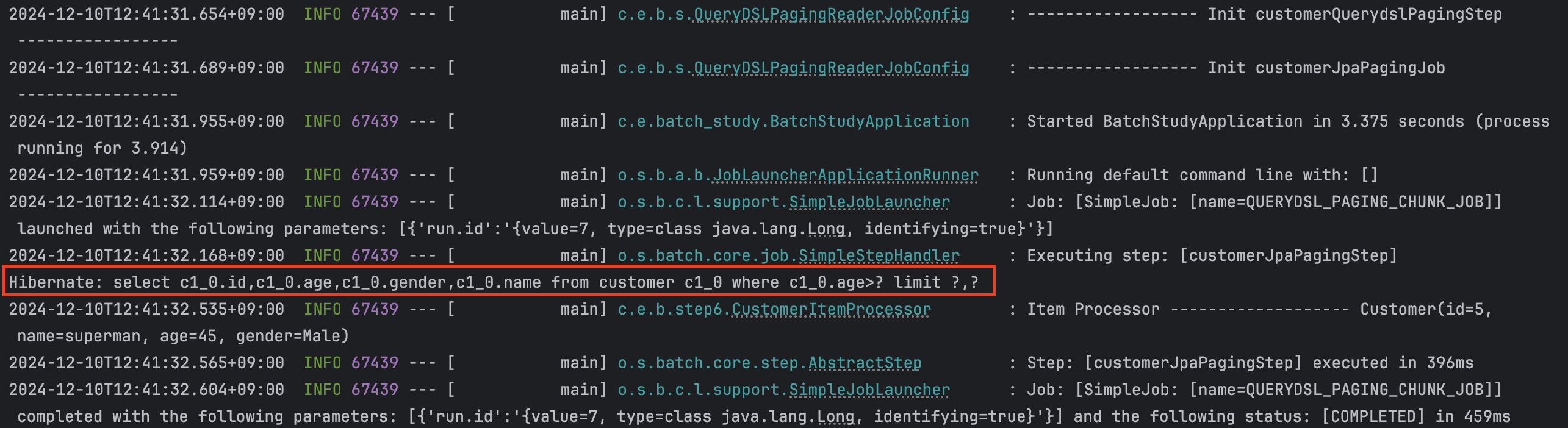

이 때는 하나의 데이터만 조건에 해당되니 쿼리를 한 번만 보내서 데이터를 읽어온 걸 확인할 수 있습니다.
### Custom ItemWriter
위와 비슷하게 CustomItemWriter 는 ItemWriter 인터페이스를 구현한 클래스이다. 인터페이스가 가지는 write() 메서드를 유연하게 원하는 기능을 추가하여 구현하면 된다.
@Slf4j
@Service
public class CustomService {

    public Map<String, String> processToOtherService(Customer item) {

        log.info("Call API to OtherService....");

        return Map.of("code", "200", "message", "OK");
    }
}
@Slf4j
@Component
public class CustomItemWriter implements ItemWriter<Customer> {

    private final CustomService customService;

    public CustomItemWriter(CustomService customService) {
        this.customService = customService;
    }

    @Override
    public void write(Chunk<? extends Customer> chunk) throws Exception {
        for (Customer customer: chunk) {
            log.info("Call Porcess in CustomItemWriter...");
            customService.processToOtherService(customer);
        }
    }
}
@Slf4j
@Configuration
public class MybatisItemWriterJobConfig {

    /**
     * CHUNK 크기를 지정한다.
     */
    public static final int CHUNK_SIZE = 100;
    public static final String ENCODING = "UTF-8";
    public static final String MY_BATIS_ITEM_WRITER = "MY_BATIS_ITEM_WRITER";

    @Autowired
    DataSource dataSource;

    @Autowired
    SqlSessionFactory sqlSessionFactory;

    @Autowired
    CustomItemWriter customItemWriter;

    @Bean
    public FlatFileItemReader<Customer> flatFileItemReader() {

        return new FlatFileItemReaderBuilder<Customer>()
                .name("FlatFileItemReader")
                .resource(new ClassPathResource("./customer.csv"))
                .encoding(ENCODING)
                .delimited().delimiter(",")
                .names("name", "age", "gender")
                .targetType(Customer.class)
                .build();
    }

    @Bean
    public Step flatFileStep(JobRepository jobRepository, PlatformTransactionManager transactionManager) {
        log.info("------------------ Init flatFileStep -----------------");

        return new StepBuilder("flatFileStep", jobRepository)
                .<Customer, Customer>chunk(CHUNK_SIZE, transactionManager)
                .reader(flatFileItemReader())
                .writer(customItemWriter)
                .build();
    }

    @Bean
    public Job flatFileJob(Step flatFileStep, JobRepository jobRepository) {
        log.info("------------------ Init flatFileJob -----------------");
        return new JobBuilder(MY_BATIS_ITEM_WRITER, jobRepository)
                .incrementer(new RunIdIncrementer())
                .start(flatFileStep)
                .build();
    }
}
간단한 예제를 통해서 작동과정을 확인해 볼 수 있습니다.
커스텀 writer의 사용성이 궁금해서 GPT에게 예시를 요청해봤습니다.
public class RestApiItemWriter implements ItemWriter<MyData> {

    private final RestTemplate restTemplate;
    private final String apiEndpoint = "https://api.example.com/data";

    @Autowired
    public RestApiItemWriter(RestTemplate restTemplate) {
        this.restTemplate = restTemplate;
    }

    @Override
    public void write(List<? extends MyData> items) throws Exception {
        for (MyData item : items) {
            try {
                // 외부 API로 데이터 전송
                restTemplate.postForObject(apiEndpoint, item, Void.class);
                System.out.println("Successfully sent data: " + item.getId());
            } catch (Exception e) {
                // 에러 핸들링 로직
                System.err.println("Failed to send data: " + item.getId() + " - " + e.getMessage());
                // 필요에 따라 예외를 던져 배치 작업을 중단하거나 재시도할 수 있습니다.
                throw e;
            }
        }
    }
}
read, process를 거친 데이터를 외부 api에 전송하는 코드입니다. 이 밖에도 이메일 전송, s3등 클라우드 스토리지에 쓰는 등의 예시를 알 수 있었습니다.
'스터디' 카테고리의 다른 글
| JpaPagingItemReader, JpaItemWriter (2) | 2024.11.12 |
|---|---|
| JdbcPagingItemReader와 JdbcBatchItemWriter (1) | 2024.11.05 |
| 스프링 배치 3주차 (0) | 2024.10.22 |
| 스프링 배치 스터디 2주차 (0) | 2024.10.14 |


